

in xero bank reconciliation, there is ‘Balance in Xero’ of $8000, ‘Statement balance (calculated)’ of $8000 and an ‘imported statement balance’ of $4000. why is the ‘statement balance (calculated)’ different to ‘imported statement balance’ and is this an issue? See example below (with exact figures)
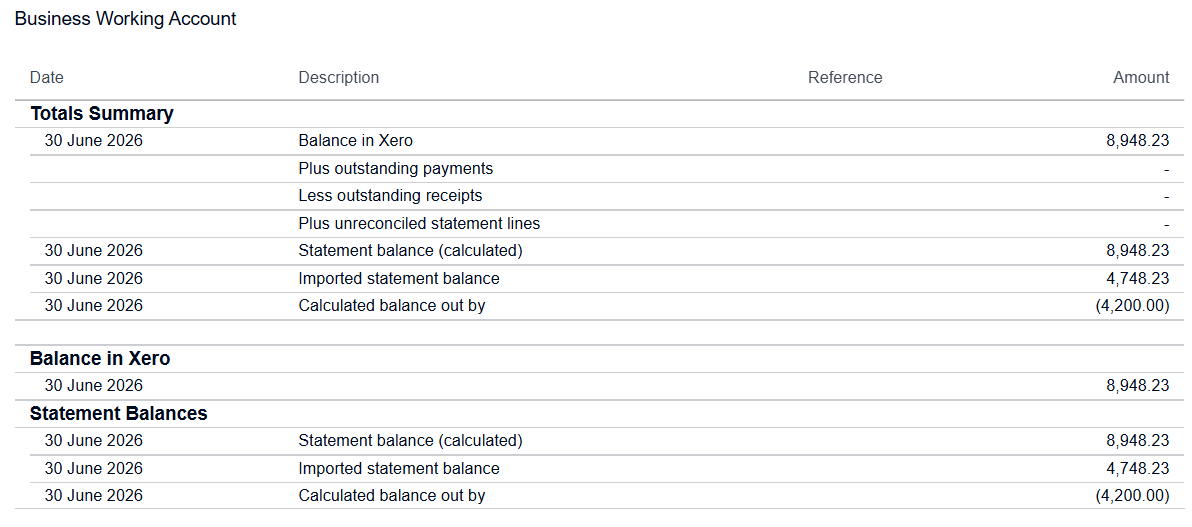
What each figure actually is:
- Balance in Xero – opening balance + all account transactions coded/entered in Xero for that bank account, up to the report date. This is the ledger balance (what shows on the Balance Sheet).
- Statement Balance (calculated) – opening balance + the sum of all bank statement lines that have been imported into Xero (via feed or manual import), as at the date of the last imported line. It’s Xero’s own running total based on the data it has received.
- Imported statement balance – the actual closing balance figure as stated by the bank itself in the statement/feed file — a face-value number from the source, not something Xero derives from summing transactions.
Why it differs:
Your “Balance in Xero” and “Statement Balance (calculated)” both being $8,000 just tells you that Xero’s ledger and Xero’s running total of imported statement lines agree with each other — internally consistent, but that doesn’t mean it agrees with the bank.
The $4,000 “Imported statement balance” is the bank’s own stated closing figure, and it’s telling you the actual bank data doesn’t match what’s been fed into Xero. That’s a real discrepancy, most commonly caused by:
- A gap in the bank feed – a chunk of transactions between two dates never came through, so Xero’s calculated running total is short (or in your case, running higher than the bank’s true balance).
- Duplicate statement lines — a feed reconnect or re-import created duplicate lines, inflating the calculated figure.
- Incorrect opening/conversion balance — if the opening balance used as the starting point for the calculated figure was wrong, everything downstream drifts.
- Partial statement import — a manual CSV/OFX import that didn’t cover the full period, or a feed interruption/reconnection that reset the running balance basis.
Is it an issue? Yes — worth investigating before you rely on the reconciliation. A $4,000 gap is material. Practical next steps:
- Pull the actual bank statement PDF for the period and check the true closing balance against the $4,000 imported figure (confirms the source data is correct).
- Check the bank account’s statement lines for date gaps — look at the “Statement Exceptions” report or the Bank Reconciliation Summary report, which can show missing/duplicate lines.
- Check the opening/conversion balance on the account for that period.
- If you suspect duplicates or a feed break, it may need a feed reconnect and a careful re-check for double-ups before you keep reconciling.
Since “Balance in Xero” ties to the calculated figure but not the true bank figure, don’t take the fact that the first two match as a sign everything’s fine — chase the $4,000 before signing off on the reconciliation.
ABN 78 624 606 295 83A Balcombe Road, Mentone. PO Box 319 Mentone Vic 3194 Telephone 0447407576 email angus@morrisonabs.com.au
Liability limited by a Scheme Approved Under Professional Standards Legislation